
How to Connect AI Agents to Lab Instruments with MCP
How to Connect AI Agents to Lab Instruments with MCP
The Model Context Protocol (MCP) lets AI agents discover, validate, and control laboratory instruments through a single open standard - replacing the custom adapters and vendor-specific SDKs that slow down every lab automation project. With over 10,000 public MCP servers and 97 million monthly SDK downloads as of early 2026, MCP has become the de facto integration layer for AI instrument control software. This guide walks through building a real MCP server for a plate reader, covering architecture, code, and the workflow that makes it all work.
Architecture - One MCP Server per Instrument
The core pattern is simple: each instrument gets its own MCP server. The AI agent acts as an MCP client, connecting to one or more servers to compose multi-instrument workflows.
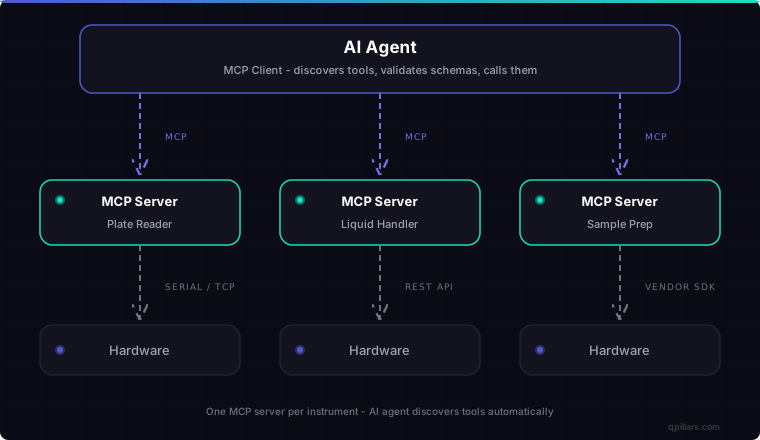
Each MCP server wraps whatever interface the instrument already has - serial, TCP, REST, or a proprietary SDK. The AI agent never touches raw hardware APIs. It speaks MCP, and MCP alone.
This architecture scales horizontally. Adding a new instrument to your lab means deploying one new MCP server. The AI agent discovers it automatically through the protocol's built-in tool discovery mechanism. No code changes on the agent side.
The Full Workflow - Discovery, Validation, Execution, Error Handling
Before writing code, understand the four-phase workflow that MCP defines for every interaction between an AI agent and an instrument.
Phase 1 - Discovery
The agent connects to an MCP server and calls tools/list. The server responds with every tool it exposes - including names, descriptions, and full JSON Schema definitions for inputs. The agent now knows what the instrument can do without any prior configuration.
Phase 2 - Schema Validation
Every tool definition includes an inputSchema that specifies parameter types, ranges, enums, and required fields. Validation happens twice: the AI client validates before sending, and the server validates on receipt. Invalid commands never reach hardware.
Phase 3 - Execution
The agent calls tools/call with validated arguments. The server executes the operation on the instrument and returns structured results in a content array. Results can include text, data URIs, or references to resources.
Phase 4 - Error Handling
If execution fails - instrument timeout, hardware fault, invalid state - the server returns an isError: true response with a descriptive message. The agent can retry, escalate to a human, or adjust its approach. No silent failures.
Code Walkthrough - MCP Server for a Plate Reader
Here is the core pattern for building an MCP server that wraps a lab instrument. The example registers a single tool for a 96-well plate reader - additional tools (status checks, full plate scans, calibration) follow the same structure.
import { McpServer } from "@modelcontextprotocol/sdk/server/mcp.js";
import { StdioServerTransport } from "@modelcontextprotocol/sdk/server/stdio.js";
import { z } from "zod";

const server = new McpServer({ name: "plate-reader", version: "1.0.0" });

// Each tool: name, description, Zod schema for validation, handler function
server.tool(
  "read_absorbance",
  "Measure optical absorbance at a specified wavelength for wells on a 96-well microplate",
  {
    wells: z
      .array(z.string().regex(/^[A-H][1-9]$|^[A-H]1[0-2]$/))
      .min(1).max(96)
      .describe("Well positions, e.g. ['A1', 'A2', 'B6']"),
    wavelength_nm: z
      .number().min(200).max(1000)
      .describe("Measurement wavelength in nanometers (200-1000)"),
  },
  async ({ wells, wavelength_nm }) => {
    // In production: send SCPI commands over serial/TCP to the instrument
    const readings = await driver.readAbsorbance(wells, wavelength_nm);
    return {
      content: [{ type: "text", text: formatReadings(readings) }],
    };
  }
);

const transport = new StdioServerTransport();
await server.connect(transport);
The Zod schema does the heavy lifting. The regex ^[A-H][1-9]$|^[A-H]1[0-2]$ restricts well positions to valid coordinates. The wavelength is bounded to 200-1000nm - the physical range of the lamp. An AI agent cannot accidentally send wavelength_nm: -50 or wells: ["Z99"] - the schema rejects it before the command reaches the instrument.
When the agent connects and calls tools/list, it receives the full JSON Schema for every tool - including parameter types, ranges, regex patterns, and descriptions. The agent knows what the instrument can do without any prior configuration or documentation.
MCP vs. REST API vs. Vendor SDK - A Concrete Comparison
To understand why MCP matters for AI instrument control software, compare the same operation - reading absorbance from a plate reader - across three integration approaches.
Traditional REST API
// REST: you must know the endpoint, auth scheme, and payload format in advance
const response = await fetch("https://plate-reader.local:8443/api/v2/measure", {
  method: "POST",
  headers: {
    "Authorization": `Bearer ${API_KEY}`,
    "Content-Type": "application/json",
  },
  body: JSON.stringify({
    wells: ["A1", "A2"],
    wavelength: 450,
    unit: "nm",
  }),
});

// No standard error format - every vendor is different
if (!response.ok) {
  const error = await response.json(); // maybe? could be text, could be XML
  throw new Error(error.message ?? response.statusText);
}
const data = await response.json(); // schema unknown until you read vendor docs
Vendor SDK
// SDK: locked to one vendor, version-coupled, often Windows-only
import { PlateReaderSDK } from "@vendor/plate-reader-sdk"; // proprietary

const reader = new PlateReaderSDK({ port: "COM3" });
await reader.connect();
await reader.initialize(); // vendor-specific init sequence
const result = await reader.measureAbsorbance({
  wells: ["A1", "A2"],
  wavelength: 450,
}); // vendor-specific types
await reader.disconnect();
MCP
// MCP: universal protocol, dynamic discovery, validated schemas
import { Client } from "@modelcontextprotocol/sdk/client/index.js";

const client = new Client({ name: "lab-agent", version: "1.0.0" });
await client.connect(transport);

// Agent discovers tools dynamically - no hardcoded knowledge needed
const { tools } = await client.listTools();
const absorbanceTool = tools.find((t) => t.name === "read_absorbance");

// Schema validation happens automatically
const result = await client.callTool("read_absorbance", {
  wells: ["A1", "A2"],
  wavelength_nm: 450,
});
// Structured response with standard format
The difference is fundamental. REST requires you to know endpoints, auth, and payload schemas before writing a single line of code. Vendor SDKs lock you to one manufacturer. MCP lets the agent discover what is available at runtime and validates every interaction against a schema. For labs with 10-50 instruments from multiple vendors, this is the difference between months of integration work and days.
Safety - Schema Validation as the First Line of Defense
In laboratory settings, a wrong command can waste expensive reagents or damage equipment. MCP's schema validation is not optional - it is structural.
The Zod schemas in the server code above do more than type-check. They enforce domain constraints:
- Well positions match a regex pattern - no invalid coordinates reach the instrument
- Wavelength is bounded to 200-1000nm - the physical range of the lamp
- Volume (in liquid handlers) can be capped at the pipette's maximum capacity
- Speed enums prevent out-of-spec motor commands
This validation runs at two levels. The AI client validates parameters against the JSON Schema before sending. The MCP server validates again on receipt using Zod. Two layers of protection before any physical action occurs.
For safety-critical operations, MCP also supports human-in-the-loop confirmation through the elicitation primitive. The server can pause execution and request explicit approval from a scientist before proceeding.
Deploying MCP Servers in a Lab Network
In production, you have options for how MCP servers communicate with clients.
Stdio transport - the server runs as a child process of the AI agent. Best for single-machine setups where the instrument is directly connected via USB or serial. Low latency, no network overhead.
Streamable HTTP transport - the server runs as an HTTP service, accepting connections from remote AI agents. Best for networked labs where instruments and agents run on separate machines. Supports multiple concurrent clients, standard HTTP authentication, and load balancing.
A practical lab deployment looks like this:
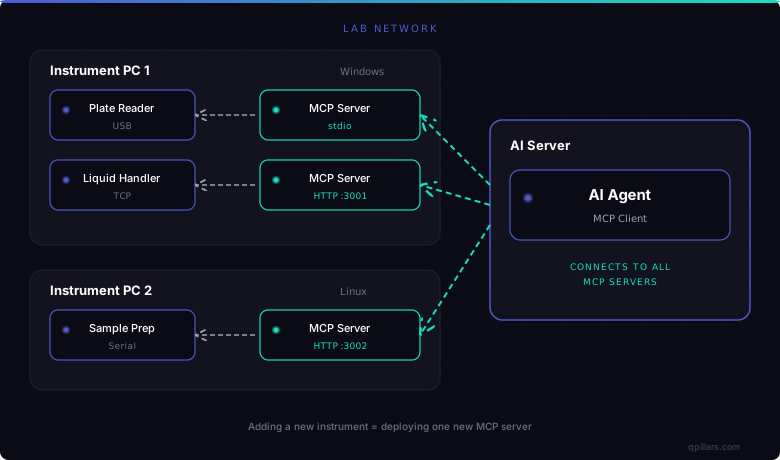
Each MCP server wraps the vendor-specific communication layer. The AI agent connects to each server over the network and discovers their tools dynamically. Adding a new instrument means deploying one new MCP server - no changes to the agent or any other server.
Current State of MCP Adoption
MCP has moved far beyond experimental. In December 2025, Anthropic donated MCP to the Agentic AI Foundation under the Linux Foundation, with OpenAI, Google, Microsoft, AWS, and Block as co-founders and supporting members.
The numbers as of early 2026:
- 10,000+ active public MCP servers
- 97 million+ monthly SDK downloads across Python and TypeScript
- Native support in Claude, ChatGPT, VS Code, Cursor, and dozens of other clients
- Official SDKs in TypeScript, Python, Java, Kotlin, C#, Go, Swift, and Rust
For laboratory automation, this means the protocol is stable, well-supported, and not going away. Industrial automation platforms like Inductive Automation (Ignition) have already announced MCP modules. The lab instrument space is next.
At QPillars, we are building MCP servers for laboratory instruments today - wrapping existing vendor APIs with the universal protocol layer. Our digital twin platform uses the same MCP interface for both simulated and real instruments, so AI agents can test protocols in simulation before running them on hardware.
Frequently Asked Questions
How do I connect an AI agent to a lab instrument that only has a serial interface?
Build an MCP server that wraps the serial communication. The server translates MCP tool calls into serial commands (SCPI, ASCII, or proprietary protocol) and returns structured responses. The AI agent never interacts with serial directly - it speaks MCP, and the server handles the translation. Libraries like serialport for Node.js make this straightforward.
What happens when the AI agent sends invalid parameters to an instrument?
MCP rejects invalid parameters before they reach hardware. Every tool definition includes a JSON Schema with types, ranges, and constraints. The AI client validates outbound parameters, and the MCP server validates them again on receipt using Zod. A request for wavelength_nm: 50000 or wells: ["Z99"] fails at the schema level, not at the instrument.
Can multiple AI agents control the same instrument simultaneously?
Yes, but with coordination. An MCP server using Streamable HTTP transport can accept connections from multiple clients. The server is responsible for managing concurrent access - typically through a queue or locking mechanism. This is no different from any shared resource: the MCP server acts as the concurrency boundary, ensuring one operation completes before the next begins.
How does MCP compare to SiLA 2 for laboratory instrument integration?
SiLA 2 standardizes instrument interfaces for traditional software orchestration - it defines commands, parameters, and data types for lab instruments. MCP standardizes how AI agents discover and invoke tools. They are complementary. A SiLA 2 instrument can be wrapped with an MCP server, making it accessible to AI agents while preserving the SiLA 2 interface for existing LIMS workflows.
Is MCP mature enough for production use in regulated lab environments?
MCP is production-ready for the protocol layer. The specification is governed by the Linux Foundation, supported by Anthropic, OpenAI, Google, and Microsoft, and has over 97 million monthly SDK downloads. For GxP-regulated environments, you still need validation documentation, audit trails, and access controls around the MCP server - but these are implementation concerns, not protocol limitations.
Key Takeaways
- MCP gives AI agents a universal protocol for discovering and controlling lab instruments - one MCP server per instrument, automatic tool discovery, schema-validated commands.
- Schema validation at both client and server prevents invalid commands from reaching hardware - critical for expensive reagents and sensitive instruments.
- Compared to REST APIs (custom per vendor) and SDKs (locked to one vendor), MCP reduces multi-instrument integration from months to days.
- With 10,000+ public servers and Linux Foundation governance as of 2026, MCP is the stable, industry-backed standard for AI instrument control software.
- Start today by wrapping existing instrument APIs with MCP servers - no hardware changes needed, and your instruments become immediately accessible to any MCP-compatible AI agent.
Written by Iacob Marian, Technical Lead & Co-founder at QPillars. Published 2026-03-21.
Technical Lead & Co-founder at QPillars
Specializes in laboratory automation, from hands-on instrument control and liquid handling to AI-driven protocol orchestration.