
How to Build a Lab Automation Orchestration Platform
How to Build a Lab Automation Orchestration Platform
To build a lab automation orchestration platform you ship four layers - a UI, an orchestration engine, a device-abstraction layer, and the instrument fleet - and the engine is the only one that is hard. At its core is a run loop: pick the next ready step in a workflow, dispatch a command to the right instrument, watch the result stream back, update state, and decide what runs next, repeating until the run is done. The make-or-break decision is the device interface: pick one uniform, self-describing interface for every instrument, or the loop drowns in per-vendor special cases. This guide walks the build in the order those decisions actually bind.
We use SiLA 2 as the concrete interface throughout because it is the cleanest vendor-neutral option for lab instruments. We stop at the control layer - getting results out into an ELN or LIMS is a different problem, teased at the end.
Step 0: be clear about the problem
A real lab is a pile of instruments that agree on nothing: a liquid handler driven by a vendor C++ SDK, a robot arm behind a proprietary TCP socket, a plate reader with a REST API, an incubator on RS-232 serial, a centrifuge you can only drive through its own GUI.
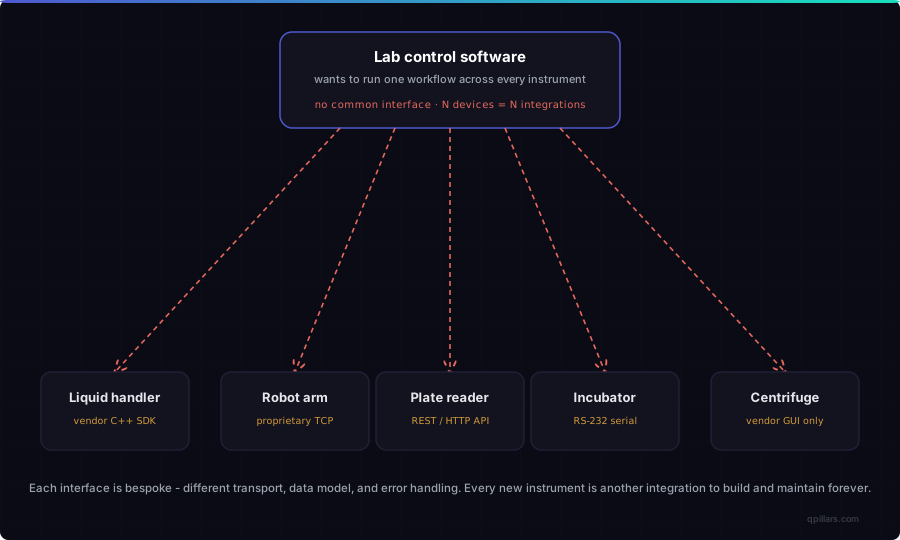
Diagram 1: the problem you are building against. Five instruments, five interfaces, five bespoke integrations. The cost is not any single connection - it is that the work is O(N), and every new instrument adds another lifetime of glue.
"Just write a script per device" works for two instruments and collapses the moment a workflow spans the fleet with branches and error handling. The whole point of the platform is to make integration cost stop growing.
Step 1: decide the layers
Lay the platform out as four layers with hard boundaries. Only one is the product; the rest exist to give it a place to run.
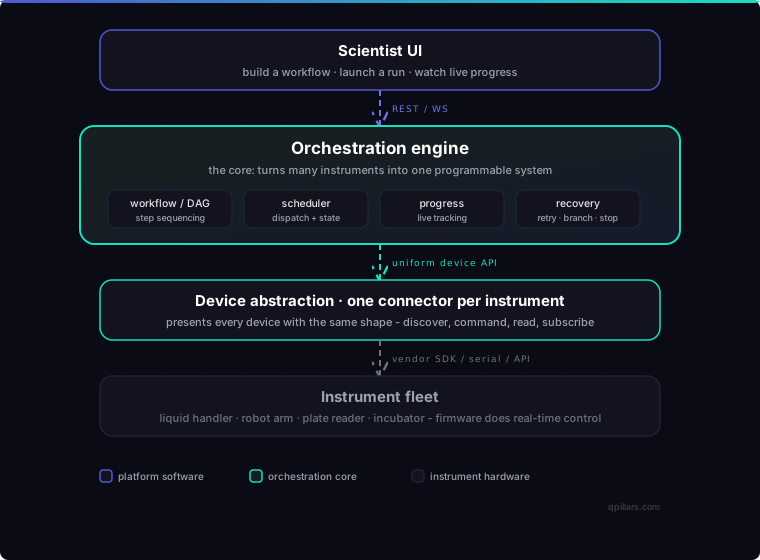
Diagram 2: the layers to build, with the orchestration engine as the core.
- Scientist UI - build a workflow, launch a run, watch live progress. Speaks plain REST and WebSocket, no instrument protocol.
- Orchestration engine - the core: workflow sequencing, scheduling, progress tracking, error recovery.
- Device abstraction - one connector per instrument, each presenting the same shape: discover, command, read, subscribe.
- Instrument fleet - firmware doing real-time control. Your platform is supervisory, never real-time.
The rule that pays off later: the engine should only ever see one device shape. Push every vendor difference down into the connector layer so it never reaches the loop.
Step 2: build the core as a run loop
The unit of work is not a command, it is a workflow - a graph of steps with dependencies and branches. Build the engine as a loop that walks that graph.
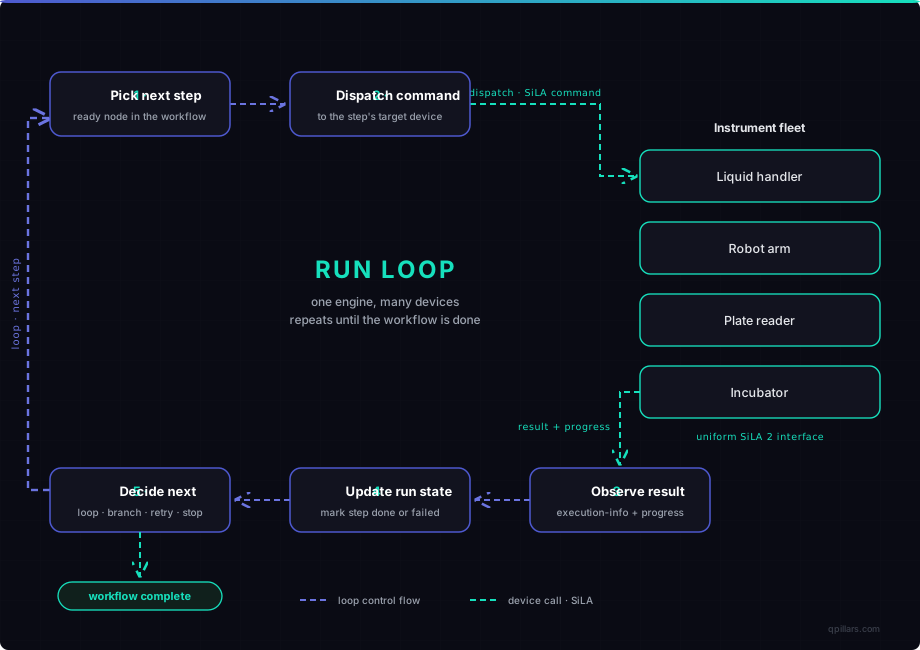
Diagram 3: the run loop to build. One engine, many devices.
One turn, five steps:
- Pick the next ready step - the next DAG node whose dependencies are satisfied, so selection is a lookup, not a guess.
- Dispatch the command to the step's target device. With a uniform interface, "start this command" is the same call on every instrument.
- Observe the result and progress. Long-running steps stream execution info back while they run, so the loop and the UI see progress, not a frozen button.
- Update the run state. Mark the step done or failed, record outputs, advance the graph. Persist this - a run that cannot survive a restart is a demo.
- Decide what comes next - loop, branch on a result, retry a transient failure, or stop. When the graph is exhausted, the run is complete.
Steps 2 and 3 are identical across devices, and that is the whole game. If instruments exposed different verbs for "start," "is it done," and "what went wrong," the loop would fork into per-vendor branches and rot. Which forces the next decision.
Step 3: choose a uniform device interface (we use SiLA 2)
This is the decision that determines whether the build succeeds. Pick one standard interface that every instrument presents, self-describing so the engine can drive a device it has never seen.
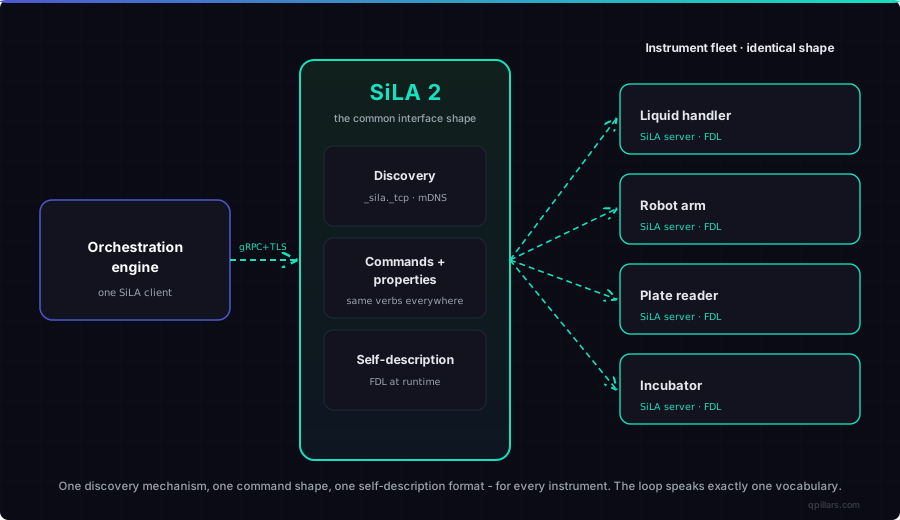
Diagram 4: the interface decision. Every device presents the same SiLA server shape.
With SiLA 2, a server exposes one or more Features - typed service interfaces - each a set of Commands (functions the client invokes) and Properties (typed values it reads). Commands and Properties can be observable, streaming intermediate values - that is how progress reaches your loop. Every Feature is described by an FDL (Feature Definition Language) XML file the client downloads and reads at runtime. That self-description lets your engine schedule, track, and recover against one shape and bind to an instrument it was never compiled against. Build to the standard, not to each vendor.
Step 4: solve discovery first - it dictates your deployment
Discovery looks like a detail and quietly fixes your entire deployment topology, so decide it early.
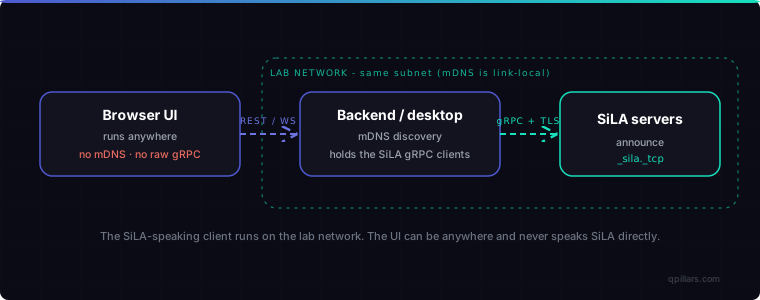
Diagram 5: discovery and the lab-side backend you have to build. SiLA servers announce over mDNS on _sila._tcp; a process on the lab network listens, keeps a live device list, and holds the gRPC clients.
Two constraints to design around:
- mDNS is link-local. Discovery only reaches the same subnet, so the process that discovers and holds the SiLA clients must run on the lab network. You cannot discover instruments from the cloud.
- Browsers cannot speak SiLA. A web page can neither do mDNS nor open the raw gRPC over HTTP/2 SiLA requires. Put the SiLA client in a small lab-side backend; let the UI reach it over REST and WebSocket from anywhere.
This gives two ways to ship the same architecture: a web app with a backend service on a lab machine, or a desktop app that bundles the backend. Either way you build the backend - a pure browser app talking to instruments directly physically cannot work.
Step 5: implement the per-device handshake
Build one generic bind sequence and run it for every device, known vendor or never-seen.
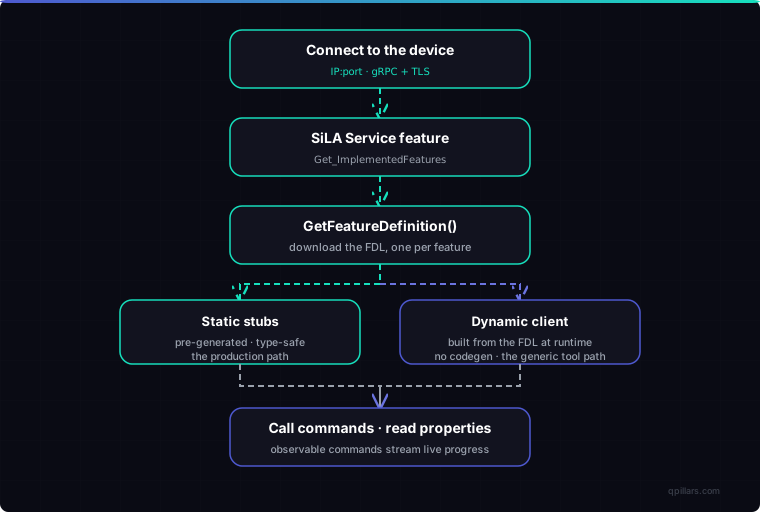
Diagram 6: the handshake to implement, run once per instrument.
Connect over a gRPC channel secured with TLS. Self-describe: every SiLA server implements the mandatory SiLA Service feature, so call Get_ImplementedFeatures then GetFeatureDefinition to download each Feature's FDL - after that round trip you know the full contract with zero prior knowledge of the device. Bind either with static stubs pre-generated from the FDL at build time (type-safe, for a known fleet) or a dynamic client built from the downloaded FDL at runtime (no codegen, for a device you never compiled against); both agree on the wire format byte for byte, so you can mix them. Call Commands and read Properties - and for a long read, an observable command returns an execution UUID, streams progress while it runs, then yields the result, which you wire straight through to the UI.
Step 6: generate interfaces, don't hand-write them
Your platform is interoperable only if you never hand-write the wire format. Generate it, so compatibility is a property of the build.
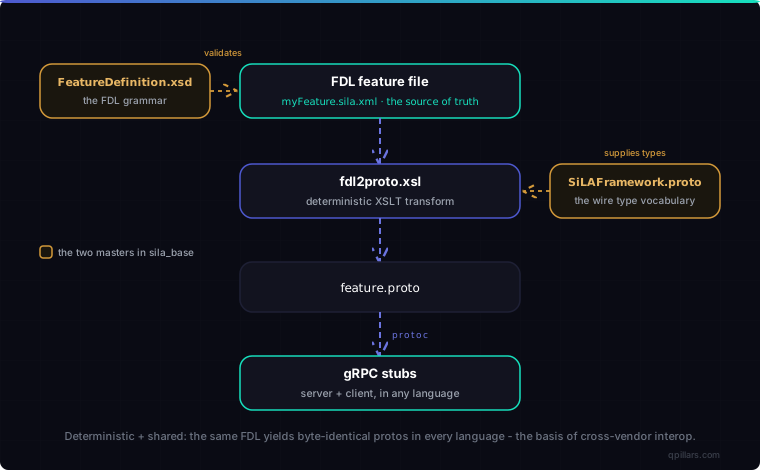
Diagram 7: the generation pipeline - the literal reason a .NET server and a Python client interoperate.
Every interface starts as an FDL file describing a Feature's Commands, Properties, types, constraints, and errors. Two master files govern it: FeatureDefinition.xsd, the grammar you validate every FDL against, and SiLAFramework.proto, the base type vocabulary (Boolean, Integer, Real, String, Binary, Date, Time, Timestamp). A deterministic XSLT transform, fdl2proto.xsl, turns the FDL into a .proto, and protoc compiles it into gRPC stubs. Because the transform is deterministic and shared, every implementation derives a byte-identical proto from the same FDL - which is why instruments from any vendor interoperate.
One caveat: the proto is a lossy projection. Constraints, descriptions, and structured errors live in the FDL, not the proto - so treat the FDL as the source of truth, which is why clients download it at runtime rather than trusting the proto alone.
Step 7: make onboarding fast
Your platform is only as broad as the instruments it covers, and the bottleneck is writing a connector per device. The leverage: many modern instruments already expose a REST API with an OpenAPI spec, and you can turn that spec into a SiLA driver mechanically.
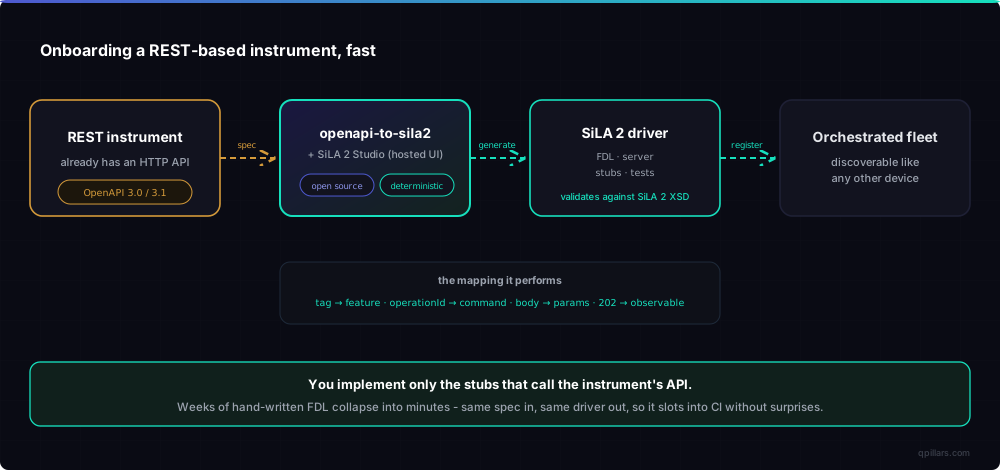
Diagram 8: removing the per-instrument bottleneck with openapi-to-sila2.
openapi-to-sila2 (open source) prepends an OpenAPI-to-FDL stage to the generation pipeline above. Point it at an instrument's OpenAPI 3.0 or 3.1 spec and it generates a runnable SiLA 2 driver scaffold - FDL, server, stubs, and tests - validated against the SiLA 2 XSD. The mapping is mechanical: each tag becomes a Feature, each operationId a Command, the request body the Command's parameters, and a long-running operation (202 Accepted) an observable Command. You implement only the stubs that call the instrument's API. That turns weeks of hand-written FDL into minutes, and it is deterministic, so wire it into CI.
Prefer to paste a spec and edit the mapping in a review screen? There is a hosted front end, SiLA 2 Studio - see SiLA 2 Studio: OpenAPI to a SiLA 2 driver in two minutes. For why REST and SiLA cannot talk directly, see why REST APIs and SiLA 2 don't talk.
What to build next: data and ELN integration
This guide stops at the control layer on purpose. The assay runs, the result comes back - but where does it go, and how does its metadata reach the systems scientists live in? That is the data layer: ELN and LIMS integration. Different problem, its own constraints, its own post - coming next.
Conclusion
Build it in the order the decisions bind: stop integration cost from growing, lay out four layers, build the engine as a run loop over a persisted workflow DAG, choose one uniform self-describing interface so the loop sees a single shape, solve discovery first, implement one generic handshake, generate the wire format, and make onboarding mechanical. The loop is the easy part to describe; the rest is what makes it real - one interface, found by discovery, generated deterministically, onboarded fast. SiLA 2 gives you the uniformity, and openapi-to-sila2 makes adding the next instrument a matter of minutes.
Key Takeaways
- A lab automation orchestration platform is four layers - UI, engine, device abstraction, fleet - and only the engine is hard to build.
- Build the engine as a run loop over a workflow DAG: pick the next ready step, dispatch, observe result and progress, update persisted state, decide what is next.
- The decisive choice is the device interface. Pick one uniform, self-describing standard so the loop sees a single shape; we use SiLA 2.
- Solve discovery early. mDNS (
_sila._tcp) is link-local, which forces a lab-side backend; the UI can live anywhere over REST. - Generate the wire format with the deterministic
fdl2proto.xsltransform and the two master files; never hand-write it, so cross-vendor interop is guaranteed by the build. - Make onboarding mechanical:
openapi-to-sila2and SiLA 2 Studio turn an instrument's OpenAPI spec into a runnable SiLA driver scaffold, so REST-based devices join the fleet fast.
Frequently Asked Questions
How do you build a lab automation orchestration platform?
Build four layers - a UI, an orchestration engine, a device-abstraction layer, and the instrument fleet - and put your effort into the engine. The engine runs a control loop over a workflow graph: pick the next ready step, dispatch a command to the target instrument, observe the result and progress, update persisted run state, and decide what runs next, until the run completes. The decision that makes or breaks it is choosing one uniform, self-describing device interface so the loop sees a single shape.
What is the hardest part of building an instrument orchestration platform?
Making every instrument look the same to the engine. Instruments ship incompatible interfaces - vendor SDKs, proprietary sockets, REST, serial - and if those differences reach the orchestration loop, it forks into per-vendor special cases and becomes unmaintainable. The fix is to commit to one standard interface (we use SiLA 2) and push every vendor difference down into the connector layer.
Why does an orchestration platform need a backend on the lab network?
Because of discovery and transport. SiLA discovery uses mDNS, which is link-local and only reaches the same subnet, and browsers can neither perform mDNS nor open the raw gRPC over HTTP/2 SiLA requires. So the SiLA client must run in a process on the lab network, and the UI talks to it over REST and WebSocket. You can ship that backend as a service on a lab machine or bundled inside a desktop app.
How do you add a new instrument to the platform quickly?
If the instrument has a REST API, generate the connector instead of writing it. Point openapi-to-sila2 or the hosted SiLA 2 Studio at its OpenAPI 3.0 or 3.1 spec and it produces a runnable SiLA 2 driver scaffold - FDL, server, stubs, and tests - validated against the SiLA 2 XSD. You implement only the stubs that call the instrument's API. It is deterministic, so it fits cleanly into CI.
Iacob is the Technical Lead at QPillars, a Zürich-based company building intelligent software infrastructure for life sciences laboratory instruments. We build vendor-neutral orchestration platforms - discovery backends, orchestration engines, and connectors - and maintain the open-source openapi-to-sila2 generator. If you are building or buying a lab automation orchestration platform, reach out at iacob@qpillars.com.
Technical Lead & Co-founder at QPillars
Specializes in laboratory automation, from hands-on instrument control and liquid handling to AI-driven protocol orchestration.