
How to Design AI Agents for Lab Automation: Start From the Question, Not the API
How to Design AI Agents for Lab Automation: Start From the Question, Not the API
To design an AI agent that operates a lab instrument well, you start from the questions a scientist would actually ask it - not from the instrument's API. The questions define the tools the agent needs, the skills it uses to combine them, and the tests that prove it works. Then you benchmark, because on a real instrument the difference between a well-designed tool surface and a naive one is not cosmetic: in our own measurements it is roughly 16x fewer tokens, 11x faster, and the difference between an answer and a silent failure.
This is the opposite of how most lab-instrument integrations are built. The default is to take the instrument's interface - its SDK, or its SiLA 2 feature set - and expose every command as a tool. That feels thorough. It produces an agent that is slow, expensive, and unreliable. Here is the method that doesn't.
Key Takeaways
- Start from the questions, not the API. List what a scientist asks the agent to do; each question shapes the design.
- Design intent-level tools, one per outcome - not one per API endpoint. Wrapping an instrument's interface one-to-one is the most common and most damaging mistake.
- Fewer, outcome-shaped tools win. Tool-selection accuracy collapses on large tool sets; degradation starts at 15-20 tools, well before any hard limit.
- The question set is one artifact with three uses: it defines the tools, the agent's skills, and the evaluation scenarios.
- Benchmark on the concrete use case. Token cost, tool-call count and latency are product features in a lab - a scientist will not wait ten minutes while an agent loops.
- Our data: on the same instrument and model, a composed intent-level tool surface ran a workflow in 8,441 tokens and 6.1 seconds; the raw surface took 134,294 tokens, 45 tool calls and 69 seconds; a poorly-scoped narrow surface silently did nothing.
The Mistake: Wrapping the Instrument's Interface
An instrument's control interface is written for engineers. It exposes primitives - move, aspirate, dispense, set-parameter, read-status - because a programmer composes those into a procedure. The tempting move is to hand all of them to the agent as tools and trust it to figure out the rest.
It does not work, and the reasons are now well documented. When an agent faces a large tool set, tool-selection accuracy drops sharply - one analysis puts it near 13% on large tool sets, with real degradation appearing once an agent has more than 15 to 20 tools in active rotation. The industry has learned this the hard way: GitHub Copilot cut its tool count from 40 to 13 and saw benchmarks improve; Block rebuilt its Linear integration from 30-plus tools down to 2. As one AWS analysis puts it, an MCP server is "an interface for intent", not a mirror of your API.
In the lab, this is worse than in a SaaS app, because the primitives are the wrong unit of thought and the cost of getting it wrong is physical. An agent reasoning about move and aspirate twenty times is twenty chances to pick wrong on a machine that consumes a real sample. The unit the agent should reason about is not a primitive. It is the scientist's intent.
Verdict: an instrument's API is the wrong tool surface for an agent, because it was designed for a programmer, not for a reasoner.
The Method: Start From the Questions
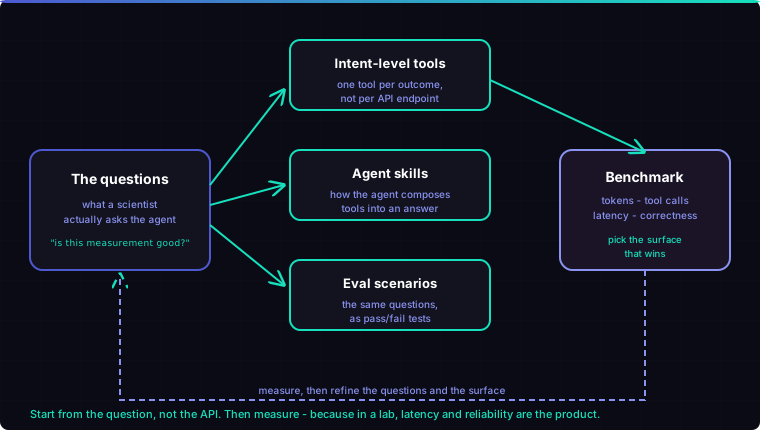
1. Write down the questions. Before any code, list what a scientist would actually ask the agent to do, in their words. "Is this measurement good enough to keep?" "What is in this sample?" "Set up a dilution series across the plate." "Why did the last run fail?" This list is the specification. It is cheap to produce and it is the single most valuable artifact in the project.
2. Turn each question into an intent-level tool. A question maps to an outcome, and the outcome is the tool. "Set up a dilution series" is one tool - prepare_dilution_series - not eleven aspirate/dispense calls the agent has to orchestrate. The tool takes the parameters a scientist would state (concentrations, plate layout) and handles the primitive choreography internally, behind a validated interface. The agent reasons about the experiment; the tool handles the mechanics.
3. Let the questions define the skills. Some questions need more than one tool composed in sequence - acquire, then assess quality, then interpret. Those compositions are the agent's skills, and they come straight from the shape of the questions, not from guesswork.
4. Let the questions define the evaluation. The same list is your test suite. Each question becomes a scenario with a known-good outcome, run repeatedly, scored pass or fail. You do not write the agent and then wonder how to test it - the questions were the tests all along.
5. Benchmark, then choose. Build the candidate tool surface and measure it on the real workflows: tokens consumed, tool calls made, wall-clock latency, and correctness across repeats. Then pick the surface that wins. This is not optional polish - see below.
Verdict: the questions a scientist asks are a single specification that shapes the tools, the skills and the tests at once.
Why You Must Benchmark: Latency and Reliability Are Product Features
In a chatbot, an extra few seconds and a few thousand tokens are invisible. On a lab bench, they are the product. A scientist standing at an instrument will not wait while an agent loops forty times to assemble an answer, and an agent that occasionally, silently does nothing is worse than no agent at all.
So we measured it. Using LiquidBridge, our liquid-handler digital twin, we ran the same workflows through the same model against three different tool-surface designs over the same underlying instrument. Only the shape of the exposed tools changed.
| Tool surface | Hardest workflow (mix samples with reagents) |
|---|---|
| Raw - every primitive exposed | 134,294 tokens, 45 tool calls, 69 seconds |
| Narrow - a thin, under-scoped surface | failed, 0 of 2 runs, zero tool calls - it did not error, it did nothing |
| Composed - intent-level tools | 8,441 tokens, 4 tool calls, 6.1 seconds |
The composed surface ran the same task in roughly 16x fewer tokens and 11x faster, with no loss of correctness - purely by changing how the instrument was presented to the agent. Nothing about the instrument changed.
The middle row is the one to sit with. The narrow surface did not throw an error. It quietly produced nothing on the hard task - the most dangerous failure mode near hardware, because a human trusts an answer that never comes as "still working" rather than "broken." You only catch that class of failure by benchmarking with pass/fail scenarios, which is exactly what step 4 gives you.
Two honest limits: LiquidBridge is a digital twin, not a physical instrument, and these numbers are one model family with a low repeat count. Treat them as a direction, not a universal benchmark. But the direction is the point - the layer between the instrument and the agent is where reliability and cost are won or lost, and almost nobody in lab automation is measuring it.
Verdict: the tool surface is a performance decision, and you cannot make it well without measuring the real workflows.
Why This Is Harder, and More Valuable, in the Lab
Generic advice to "consolidate around intent" is now everywhere. Applying it to instruments is harder for three reasons, and each is a reason it is worth doing well.
The primitives are genuinely low-level - an instrument SDK gives you motion and I/O, not experiments - so the intent layer you have to build on top is thicker than for a typical web API. The correct intent tools require domain knowledge: knowing that "is this measurement good" means signal-to-noise for one instrument and something else for another is the difference between a useful tool and a wrong one. And the cost of a bad tool call is physical and sometimes irreversible, which raises the bar on reliability far above a software-only agent.
That difficulty is the moat. An intent-level tool surface for a lab instrument encodes real laboratory knowledge, and it is the opposite of a one-to-one API wrapper anyone can generate. It is the part of an agentic lab system that is actually hard to build - and therefore the part worth building well.
Frequently Asked Questions
How do you design tools for an AI agent that controls a lab instrument?
Start from the questions a scientist would ask the agent, and turn each question into a single intent-level tool that delivers the outcome - not one tool per instrument API endpoint. The same question set also defines the agent's skills and its evaluation scenarios. Then benchmark candidate tool surfaces on token cost, tool-call count, latency and correctness, and ship the one that wins.
Why not just expose the instrument's whole API as tools?
Because tool-selection accuracy degrades sharply on large tool sets - noticeably past 15-20 tools - so an agent handed dozens of low-level primitives becomes slow, expensive and unreliable. Instrument primitives are also the wrong unit for a reasoning model: it should reason about the experiment, not about individual motion and I/O calls.
What is an intent-level tool?
A tool defined by a scientist's outcome rather than a machine primitive. "Prepare a dilution series" or "assess measurement quality" are intent-level tools; aspirate, dispense and read_status are primitives. The intent-level tool takes the parameters a scientist would state and handles the primitive choreography internally, behind a validated interface.
How much does tool-surface design actually matter?
In our measurements on a liquid-handler digital twin, a composed intent-level surface ran a workflow in about 16x fewer tokens and 11x faster than a raw primitive surface, with no loss of correctness - and a poorly-scoped surface failed silently. In a lab, where latency and reliability are product features, that gap is decisive.
Do I still need SiLA 2 or MCP if I design tools this way?
Yes - they are complementary. SiLA 2 or a vendor SDK is how you reach the instrument's primitives; MCP is how you expose your intent-level tools to any agent. The method here is about what tools you design on top of that plumbing, and how you validate them.
Building a lab agent? We design the tool layer between agents and instruments - intent-level tools, the skills that compose them, and the evaluation harness that proves they work - and we measure it on real workflows. If you have an instrument and a set of questions your scientists ask it, get in touch and we will tell you what an agent can do with it, and what it will cost per answer.
Technical Lead & Co-founder at QPillars
Specializes in laboratory automation, from hands-on instrument control and liquid handling to AI-driven protocol orchestration.